SaaS Data Protection: Closing the Backup Gap in Enterprise Microsoft 365 and Salesforce

Ask an IT director whether their Microsoft 365 tenant is backed up and the answer is usually yes. Ask what would happen if an administrator account were compromised at nine in the morning and used to purge mailboxes and site collections by ten, and the answer becomes considerably less certain. That gap between assumed and actual recoverability is the central problem in saas data protection, and it exists because the platform's built-in retention was designed for accidental deletion rather than for deliberate destruction. This article sets out where the shared responsibility line actually falls, what the native controls do and do not cover, and how to build recovery you can evidence. Our note on preventing cloud and insider data leaks covers the exposure side of the same estate.
Key Takeaways
- Every major SaaS provider commits to platform availability, not to the recoverability of your data after a deletion, a malicious administrator or a corrupted integration.
- Native retention is time-bounded and administratively reversible, which means the same privileged account that caused an incident can usually shorten or disable the protection meant to survive it.
- Recovery objectives for SaaS should be set from the same business impact analysis as everything else, then tested with a real restore rather than assumed from a retention setting.
Where the Shared Responsibility Line Actually Falls
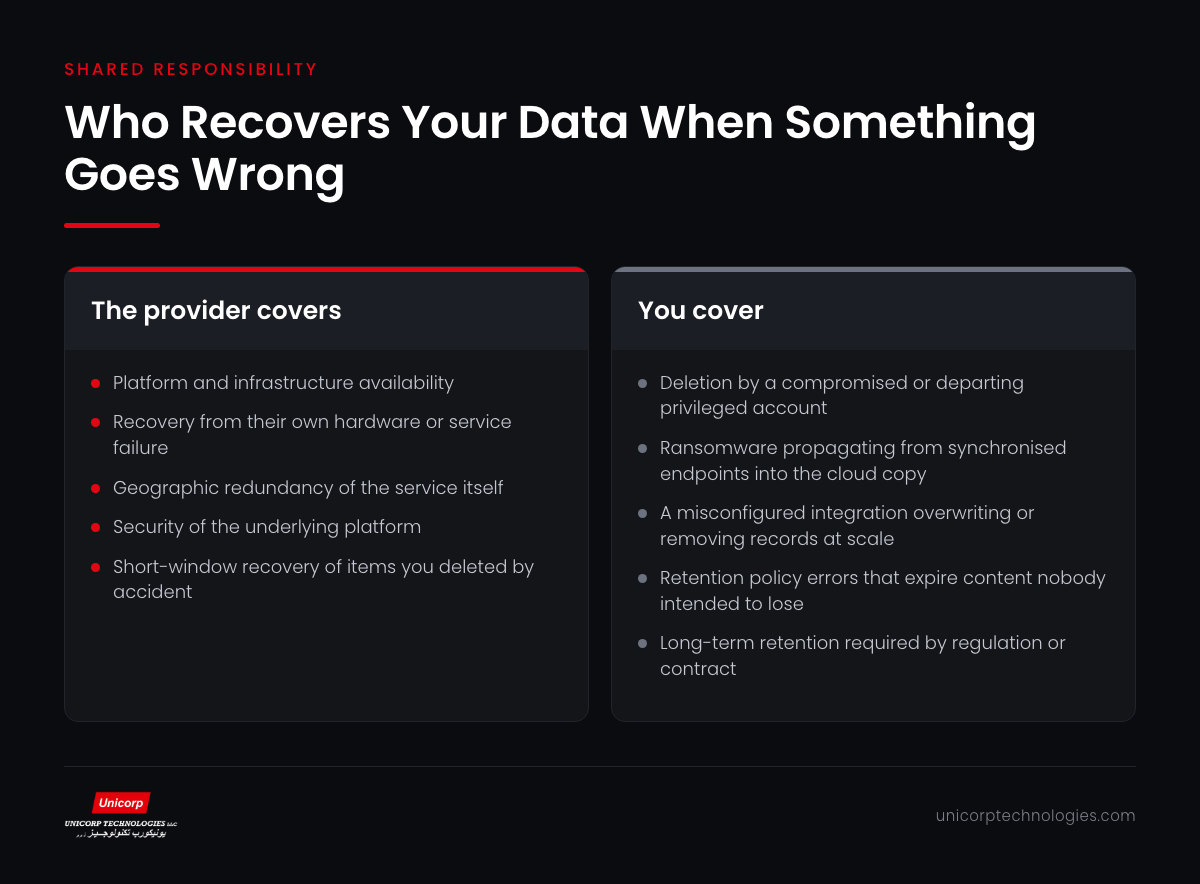
Every major SaaS agreement draws the same saas data protection boundary, though rarely in language that reaches the people making backup decisions. The provider is responsible for the service: infrastructure, platform availability, and protection against their own failures. The customer is responsible for the data inside it, for who can access it, and for whether it can be restored after the customer's own systems or people cause a loss.
This is not a loophole. It is the only workable arrangement, because the provider cannot distinguish a legitimate bulk deletion performed by an authorised administrator from a malicious one. Both arrive as valid, authenticated API calls. The platform executes what it is told, and the record of who told it is an audit log, not a recovery mechanism.
The practical consequence is that four scenarios sit entirely on the customer side. Malicious deletion by a compromised or departing privileged account. Ransomware that encrypts synchronised content and propagates that encryption to the cloud copy. A misconfigured integration that overwrites or removes records at scale. And retention policy errors that expire content nobody intended to lose.
None of these is exotic. All four appear regularly in incident reports, and in each the provider's response is correct and unhelpful in equal measure: the service performed exactly as instructed. Governance guidance such as the SaaS governance working group material from the Cloud Security Alliance is a useful reference for mapping these responsibilities formally.
Enterprises that write this boundary into their own control documentation, rather than assuming it, tend to discover the gap during a design review instead of during an incident.
What Native Retention Does and Does Not Cover
Native saas data protection features provide layered retention that is genuinely useful within its design intent. Deleted items move to a recycle bin, then to a second-stage bin, then expire. Retention policies can hold content for defined periods. Version history preserves prior states of documents. Legal hold preserves everything for named custodians during litigation.
Three limits define what this cannot do. First, it is time-bounded, and the windows are measured in days or a small number of months by default rather than in years. Second, it is administratively reversible: an account with sufficient privilege can shorten retention, release a hold or purge content permanently, which is precisely the capability an attacker seeks. Third, restore granularity is often coarse, so recovering one mailbox folder from a point in time can be considerably harder than the retention settings suggest.
Customer relationship platforms have their own version of the same problem. Records deleted through the interface are recoverable for a limited window; records removed through a bulk API operation frequently are not. Sandbox refreshes, integration errors and data-loading mistakes routinely produce losses that no native feature will reverse.
The test that settles the question is straightforward. Ask your platform team to restore a single named document to its state on a specific date ninety days ago, and time the exercise. The answer, and the time it takes, tells you far more about your actual position than any retention configuration screen.
Designing Backup That Survives the Incident
Effective saas data protection follows the same principles as any other backup design, with one addition specific to cloud platforms. The copy must be independent of the source, meaning it does not live in the same tenant and is not reachable using the same credentials. It must be immutable for a defined period, so that a privileged account cannot shorten or delete it. It must be restorable at useful granularity, down to an individual item rather than only an entire workload. And its retention must be driven by business and regulatory requirement rather than by the platform's defaults.
The addition is identity separation. A backup that authenticates to your primary directory and is administered by the same accounts that administer production shares its fate in a credential compromise. The backup service should use its own identity plane with its own multi-factor requirements, so that taking the tenant does not take the backups with it.
Coverage should be enumerated explicitly rather than assumed from a product name. Mail, calendar and contacts. Document libraries and personal file storage. Collaboration channels and their embedded conversations. Planner and task data. For customer platforms, the record data, the attachments and the metadata and configuration that make the records meaningful. Gaps in this list are usually discovered during a restore, which is the worst moment to find them.
Retention periods should be set per data class using the same business impact analysis that drives the rest of your recovery planning. Financial records, HR files and regulated correspondence generally require years; routine collaboration content may need months. Applying one retention period to everything overspends on the majority and underprotects the minority that matters.
Our note on unified storage as the basis of cyber resiliency covers the platform architecture that supports these commitments.
The Restore Test Nobody Runs
Backup success rates are the saas data protection metric most organisations report and the one least connected to recoverability. A green dashboard confirms that a job completed, not that the data it produced can be turned back into working content within an acceptable window.
Run four restore scenarios at least annually. A single item to a point in time, which is by far the most common real request. An entire user's data after a departure or a compromise. A bulk restore of a document library or record set following an integration failure. And a full workload recovery, which tests the parts of the process that only appear at scale.
Time each one and record the result against your stated recovery objective. Most enterprises running this exercise for the first time find that single-item restore is fast, bulk restore is slower than expected by an order of magnitude, and full workload recovery has never been attempted at all.
Test the failure paths as well as the success paths. What happens when the person who normally performs restores is unavailable. Whether the runbook is stored somewhere that survives a tenant compromise. Whether the backup administration console can be reached if the primary identity provider is down. Incident management guidance such as the NCSC collection on incident management covers the process design around these questions.
Findings from restore tests should be tracked like audit findings, with owners and closure dates. A restore test that produces no findings usually means the scenario was too easy.
Governance, Retention and Regulatory Fit
Backup and retention answer different questions and should be governed separately. Backup exists to restore a working state after loss. Retention exists to keep records for a period defined by law, regulation or contract, and to dispose of them afterwards. Treating one as the other produces either over-retention, which increases discovery exposure, or under-retention, which creates a compliance gap.
For UAE enterprises with regulatory obligations, the retention schedule should be built from those obligations first, then implemented in whichever combination of native retention and independent backup delivers it. Where data residency requirements apply, the backup location matters as much as the primary location, and that question should be settled before a platform is selected rather than after.
Data loss prevention sits alongside backup rather than inside it. Prevention controls stop sensitive content leaving; backup restores content that has been lost. Enterprises frequently fund one and assume it covers the other, which leaves either a recovery gap or an exposure gap. Our note on why classification and rights management are essential covers the prevention side in detail.
Ownership needs naming. In most organisations the platform team owns the tenant, the security team owns the policy and nobody owns recoverability, which is why the gap persists through multiple audit cycles. Assigning a single accountable owner for SaaS recoverability, with a reporting line to the same committee that reviews continuity, closes it faster than any tooling decision.
If you want to establish where your current position sits, our data protection team can run the restore test with you and document the result. You can also see how our infrastructure and data platform practice supports independent, immutable copies across cloud and on-premises estates.
A Practical Starting Sequence
Begin any saas data protection programme with an inventory of what your platforms actually hold and which business services depend on each. This is usually shorter than expected and immediately clarifies which workloads need years of retention and which need months.
Next, document the current position honestly: what native retention provides, what windows apply, who can change them, and what has actually been restored successfully in the last twelve months. This document is the baseline every later decision refers back to.
Then close the identity separation gap, because it is the cheapest high-impact change available. Move backup administration onto its own identity plane with its own factors, and confirm that no production administrator account can alter backup retention.
Only after that should you evaluate independent backup tooling, with the coverage list, granularity requirements and retention schedule already written. Buying first and scoping afterwards is how enterprises end up with a product that backs up mail beautifully and collaboration channels not at all.
Finally, put the four restore scenarios into the annual test calendar alongside your infrastructure recovery tests, and report the timings to the same committee. Recoverability that is measured improves; recoverability that is assumed does not.